
Employee time tracking without sending your staff’s faces to the cloud
Read Time:4 Minute, 6 Second
Small businesses in the UK have been running into the same regulatory question over the last few years. You want to track when employees clock in and out. Face recognition is faster and harder to fake than a paper sheet or a swipe card. But the moment you point a camera at the staff entrance, you are processing biometric data, and the Information Commissioner’s Office has views about that. In 2024 the ICO publicly reprimanded a UK leisure operator for running a cloud-based facial recognition time clock without a proper lawful basis. The ruling was a wake-up call: if you are going to put cameras at the staff entrance, the data flow needs to be defensible.
The standard cloud-vendor response is to bury you in compliance paperwork. You sign a 14-page privacy notice, run a Data Protection Impact Assessment, and explicitly nominate a lawful basis under Article 9 of UK GDPR. For a chain of 200 sites with an in-house Data Protection Officer, that is just the cost of doing business. For a 12-person cafe in Bristol, a four-chair salon in Brighton, or a six-bench joinery workshop in Leeds, it is a project nobody has the time or appetite for.
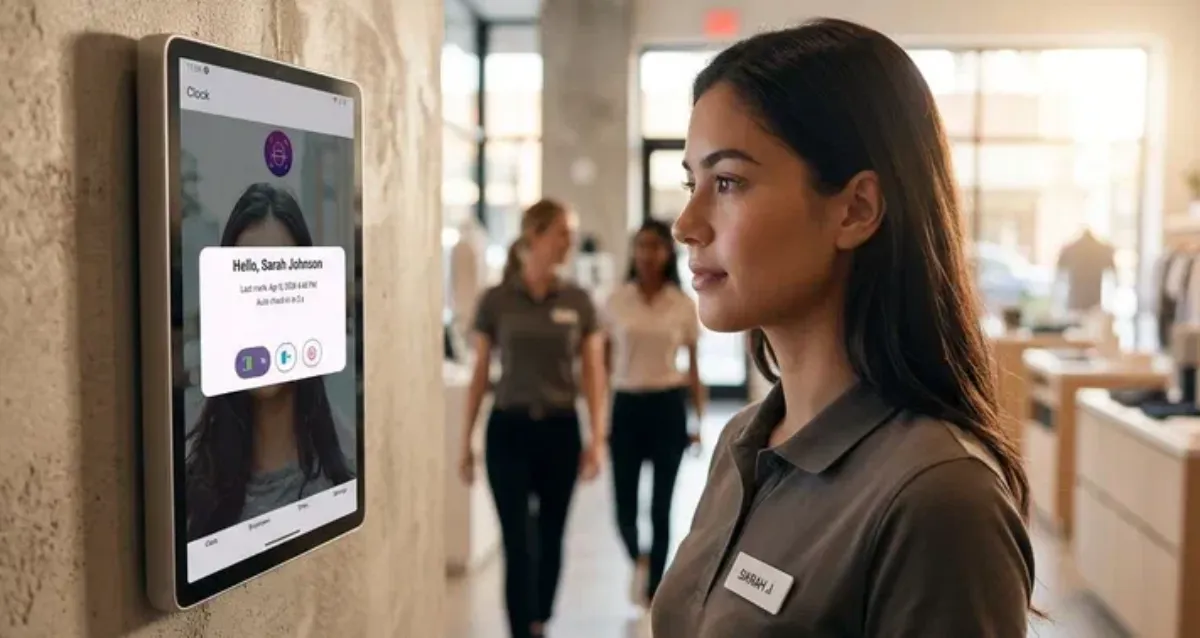
There is a different approach worth considering. FaceClock is an open-source Android time clock built for the offline, single-location case. The whole product runs on one Android device that you mount somewhere convenient: by the entrance, behind the till, in the staff corridor. Employees walk past, tap the button on screen, look at the camera, and the app records the timestamp. Clocking out works the same way. There is no app on the employee’s phone, no login, no card, no PIN.
What changes the regulatory picture is what the app does not do. The Android manifest declares one permission, CAMERA. There is no INTERNET permission to grant or revoke. There is no Firebase, no Sentry, no analytics SDK, no telemetry pinging home. The face matching happens locally, on the device, against a small SQLite database that holds employee profiles and shift records. The biometric data does not leave the device because there is no network capability for it to leave through. From a UK GDPR perspective, the conversation changes: you are still processing special category data, but it stays on hardware you own, on your premises, with no third-party processor in the chain.
Real schedules tend to break the assumptions baked into cloud time-clock software. A shift that starts at 22:00 and ends at 06:00 is normal for restaurants, security, and overnight retail. FaceClock stores each shift as a pair of millisecond timestamps and does not care which calendar date either falls on. Cross-midnight shifts are one record, not two halves. Weekly hours come out right without any boundary-of-day workarounds.
Auto-clock-out is built in, configurable, with a default of 12 hours. If someone forgets to clock out, the next clock-in arriving more than 12 hours later closes the old shift and opens a fresh one. Manual edits are supported: a manager can adjust in or out times, swap or delete captured photos, or remove a shift entirely. Shift records and their attached photos auto-purge after 90 days via a background job that runs hourly. Employee reference photos persist until you delete them yourself.
For payroll the app exports CSV (employee name, in and out timestamps, duration, status) and a multi-page A4 PDF that pairs each timestamp with the actual clock-in and clock-out photo. The PDF is the version most useful for an audit trail; the CSV drops straight into a payroll spreadsheet.
This is not a tool for every business. If you run a chain across multiple high streets and need a unified dashboard, real-time alerts when someone is late, and integrated payroll APIs, FaceClock is not your fit. The cloud vendors do those things well and they have their place. If you run one location, ten or twenty staff, and you would rather not have your employees’ faces on someone else’s server, the offline single-device design is exactly the point.
The minimum requirement is Android 7.0, which means a refurbished tablet from five or six years ago does the job. The app is free on Google Play. The full source is on GitHub for anyone, including a sceptical IT auditor or a DPA-conscious accountant, to read.

Happy
50 %

Sad
0 %

Excited
0 %

Sleepy
0 %

Angry
0 %

Surprise
50 %
 1
1
 1
1
More Stories

How Do Solar Panels Fit Into a Smart Home System?
If you are considering installing solar panels, you may also be wondering how they could fit into a wider smart...
Private Leased Offices in London: How to Plan Space, Costs and Fit-Out
A private lease can give you control of your own suite or floor in London. Before committing, establish which costs...
Enterprise Multi-Accounting: Finding a Reliable Multilogin Alternative
Operating multi-profile workflows across commercial digital platforms requires complete technical independence between concurrent browser sessions. Modern web services deploy complex...
Why Retention Matters More Than Sales in a Subscription Business
There's a moment that catches out almost everyone running a subscription business for the first time. Month one goes well....
Why Your Employee Handbook Needs an Annual Audit
The handbooks that account for the majority of legal problems aren't visibly outdated. At first glance, they often appear modern...
How to Design a High-Impact Trade Show Booth Without Sacrificing Sustainability
Good design creates less waste. The big savings can be found at the end of the show because that's where...